

Reach Studio AI TKR7000 media server for smart classrooms, lecture capture, remote teaching and conference recording in one terminal.
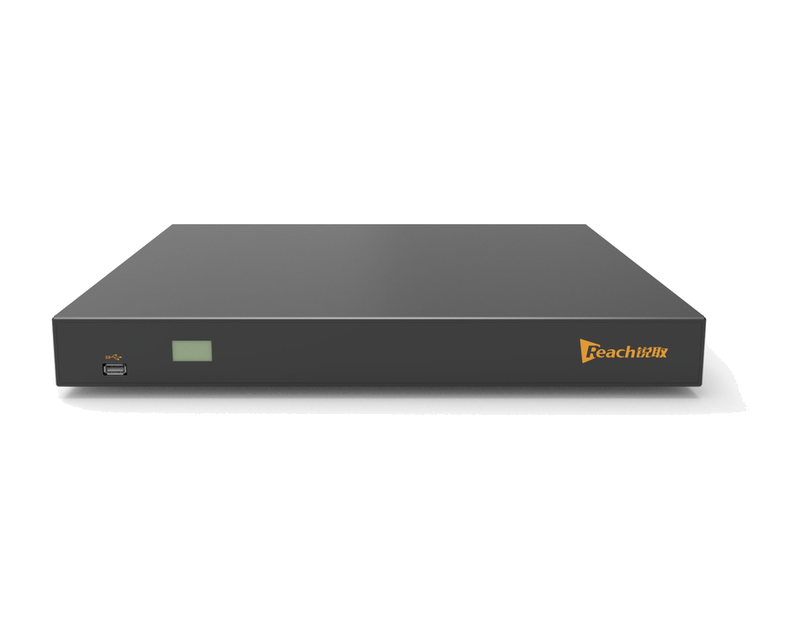
Reach Studio AI TKR7000 is a 1U rack-mount classroom media processor that puts an entire production studio in a single box. It captures, switches, tracks, records, streams and distributes up to 6 video sources at once — no separate recorder, switcher, tracker or PoE switch on the desk.
With image-recognition auto tracking and automatic source switching, the system follows the lecturer and the listeners and moves between lecturer close-up, podium panorama, listener close-up, listener panorama, PC presentation and electronic whiteboard — so every lesson is recorded naturally, without an operator. It addresses the needs of classrooms and meeting rooms: multi-camera capture and recording, seamless switching and tracking control between different camera models, real-time audio-video interaction, multi-platform synchronous broadcasting, and large-scale deployment and management.
6 sources 4× SDI / IP camera + 2× HDMI in | 3 × HDMI PGM out + local visual direct | 2 TB Local storage (1/2/4/8 TB optional) | 6-port PoE network switch built in |
 |  |
1U rack-mount media processor TKR7000 (front & rear) · optional 7-inch CL-X8A desktop visual control panel
One device instead of five Audio/video capture, auto tracking, auto switching, recording, live streaming and a PoE network switch are integrated in a 1U chassis — fewer boxes, fewer cables, one management page. | Cameras powered over one cable The built-in 6-port switch provides 4 PoE LAN ports and 2 LAN ports, so cameras are powered and connected with a single Cat5e run. |
| TKR7000 — Media processor | All-in-one capture / record / stream / switch / control host; supports up to 6 video sources. |
|---|---|
| CL-X8A — 7-inch touch control panel | Desktop visual controller connected over Cat5e; system power, source switching, recording and interactive teaching control in one touch. |
| CS100 — Button control panel | Physical-key controller; an alternative to the CL-X8A touch panel. |
| HD850 — HD close-up PTZ camera | 1080p60, 20× optical zoom; captures lecturer and listener close-ups (see parameters below). |
| DCS310 / DCS600 — Director | Network producing switcher software (DCS310) or local hardware director keyboard (DCS600). |
| TAP3200 — Classroom audio | Reach Array 32 ceiling microphone for classroom audio pickup. |
| Media Center Pro (optional) | Backup and upload recordings to network storage, or publish to the VOD platform. |
Note: the HD850 PTZ camera, CL-X8A / CS100 control panel, DCS310 / DCS600 director and TAP3200 audio are system components — please confirm the exact Bill of Materials for your project with our sales team.
One processor replaces the capture card, tracker, switcher, recorder, streaming encoder and PoE switch in a classroom or conference room.
FEATURE 01 Up to 6 video sources, one box Capture, encode and record up to 6 screens — 4× SDI camera inputs (or 4K-HD IP cameras) plus 2× HDMI inputs for PC/PPT and electronic whiteboard — with 3× HDMI outputs for local monitoring. | FEATURE 02 Auto tracking & auto switching Image recognition and multi-frame comparison work out the position and detect the lecturer’s and listeners’ motion — tracking both without any wearable infrared device. The system then switches between shots, recording teaching activities naturally. |
FEATURE 03 Three-channel live streaming Push to up to three platforms simultaneously — YouTube, Facebook, Twitch and other CDNs — over RTMPS / RTMP / RTSP, while the built-in streaming server delivers to local web browsers. Bitrate can be adjusted dynamically to suit network conditions. | FEATURE 04 Movie mode & Resource mode Standard MP4 recording with simultaneous high- and low-bitrate files: the high bitrate for quality archiving, the low bitrate for live streaming and video-on-demand on mobile devices or low-bandwidth networks. |
FEATURE 05 Three ways to direct Direct locally from the HDMI output with mouse and keyboard, from the network director software DCS310, or from the DCS600 broadcast control keyboard. Transition effects and easily configured LOGO, title and subtitles are included. | FEATURE 06 Built-in 6-port PoE switch A self-contained network switch with 2× LAN and 4× PoE LAN ports powers and connects the cameras over a single cable — less cabling, simpler deployment and easier device management. |
FEATURE 07 Real-time video interaction The built-in SIP server and H.323 support enable two-way audio and video interaction between TKR7000 devices, and interoperability with third-party video conferencing systems for remote and immersive teaching. | FEATURE 08 File management & USB copy Web-based management to view, search, download and annotate recordings; storage on local disk, an FTP server or the Reach media center pro platform. A USB 3.0 port copies the high-quality movie-mode file to a mobile storage device. |
| Web UI | Built-in web interface; works with Edge, Chrome, Safari and Firefox. |
|---|---|
| Network & serial control | IPv4 / IPv6 configuration; control via network or serial (RS232 / RS485 / VISCA over IP). |
| Remote management | DCS310 network director connects over the internet for remote management and direction. |
| Audio | Multiple audio input / output types with seamless switching; line-out for monitoring. |
| Languages | English, Chinese. |
| Smart classrooms | Lecture capture | Remote interactive teaching | Corporate conference | Live production | Medical education |
Smart education classroom Capture, broadcast and interact in real time across multiple classrooms and campuses; schedule recording from the course timetable, with the process running non-intrusively. | Remote interactive teaching 1+N multi-party interaction for large-scale open classes; dual outputs and SIP / H.323 keep local and remote sites in sync with layout control from the touch panel. |
Live video production Acts as a live streaming studio with multi-scene switching, control, recording and transitions for events, campus TV and company broadcasts. | Conference recording & streaming Multi-scene switching in corporate meetings — one camera on the close-up, one wide-angle, plus PC / PPT presentation with picture-in-picture for a better viewing experience. |
Values are taken from the official Reach Studio AI TKR7000 datasheet and the HD850 / CL-X8A specifications. Please confirm project-specific configuration with our sales team.
| Model | TKR7000 |
|---|---|
| Operation system | Linux OS |
| Video input | Up to 6 sources: lecturer close-up, podium panorama, listener close-up, listener panorama, presentation from PC and electronic whiteboard |
| Video input resolution | SDI IN: 720p@50/60, 1080p@25/30 (reserved when working with 4K-HD IP cameras) HDMI IN: 1024×768, 1280×720, 1366×768, 1440×900, 1920×1080 |
| Video output | 3× HDMI out |
| Video output resolution | HDMI OUT: 1080p@50/60 Recording: 320×180, 480×270, 640×360, 960×540, 1280×720, 1920×1080 |
| Video encoding | H.264 High Profile |
| Frame rate | 25 fps / 30 fps |
| Recording file size | 300 / 500 / 600 / 800 / 1000 / 1500 / 2000 / 2500 / 3000 / 3600 MB per hour |
| Audio | Encoding AAC-LC, 128 Kbps, 48 KHz sample rate |
| Tracking | Works with auxiliary positioning camera |
| File format | Movie mode & Resource mode (standard MP4) |
| Network port | 6× RJ45 (including 4 PoE ports) |
| Language | English, Chinese |
| Storage | 1 TB / 2 TB / 4 TB / 8 TB (optional); 2 TB default |
| Power | DC 48 V |
| Dimensions | 430 × 335 × 44.5 mm (L×W×H) |
| Weight | 5.0 kg |
| Environment | Relative humidity 10%–90%; working temperature -10°C to 50°C; storage temperature -20°C to 60°C |
| Video system | HD: 1080p/60, 1080p/50, 1080i/60, 1080i/50, 1080p/30, 1080p/25, 720p/60, 720p/50, 720p/30, 720p/25; SD: 480i, 576i |
|---|---|
| Sensor | 1/2.7" CMOS, effective pixel 2.07 M, progressive scan |
| Lens | 12× optical, f = 4.42–88.5 mm, F1.8–F2.8; 16× digital zoom (optional) |
| Minimal illumination | 0.05 Lux @ (F1.8, AGC ON) |
| Shutter / white balance | 1/30 s – 1/10000 s; auto, indoor, outdoor, one push, manual, specified colour temperature |
| Image | Backlight compensation, 2D & 3D digital noise reduction, video S/N ≥ 55 dB |
| Field of view | Horizontal 60.7°–3.36°, vertical 34.1°–1.89° |
| Pan / tilt | Pan ±170° at 1.7°–100°/s; tilt -30° to +90° at 1.7°–69.9°/s; H & V flip; image freeze; 255 presets at 0.1° accuracy |
| Output & interfaces | 1× HDMI (v1.3); 1× 3G-SDI BNC (SMPTE 424M); 1× CVBS 3.5 mm; 1× RJ45 10M/100M; 1-ch 3.5 mm line in; 1× USB 2.0; RS232 in / out and RS485 (VISCA / Pelco-D / Pelco-P) |
| Power & environment | DC 12 V, 1.0 A max, 12 W max; operating -10°C to 40°C; storage -20°C to 50°C |
| Size / weight | 169 × 142 × 164 mm; net weight 1.35 kg |
HD850 HD close-up PTZ camera · TKR7000 rear panel
| Operation system | Android |
|---|---|
| CPU / memory | 4-core 1.8 GHz; 2 GB memory; 32 GB SSD storage |
| Screen | 7-inch touch screen, 1280 × 800 |
| Functions | System power control; video source switching; start / stop recording; interactive teaching management (call, hang up, switch); HDMI output; external TF card |
Front panel
| 1 · USB port | USB 3.0, for downloading the latest file |
|---|---|
| 2 · LCD | Displays system info, IP address, version, status, etc. |
Rear panel
| 1 · Control port | RS232 serial control port with one 12 V power port — COM1 lecturer close-up, COM2 listener close-up, COM3 lecturer panorama, COM4 listener panorama, COM6 control panel |
|---|---|
| 2 · SDI IN 4 | SDI video input for listener panorama (reserved when working with 4K-HD IP camera) |
| 3 · SDI IN 3 | SDI video input for lecturer panorama (reserved when working with 4K-HD IP camera) |
| 4 · SDI IN 2 | SDI video input for listener close-up (reserved when working with 4K-HD IP camera) |
| 5 · SDI IN 1 | SDI video input for lecturer close-up (reserved when working with 4K-HD IP camera) |
| 6 · HD IN 2 | HDMI video input for PC or laptop |
| 7 · HD IN 1 | HDMI video input for electronic whiteboard |
| 8–10 · HD OUT 1–3 | HDMI output ports 1, 2 and 3 |
| 11 · USB 1&2 | USB 2.0 ports for keyboard, mouse, etc. |
| 12–13 · Switch / reset | Power on / off switch; reset system |
| 14 · DC IN | DC 48 V power input |
| 15–17 · Audio | MIC IN (RCA); LINE IN / MIC IN / LINE OUT (Phoenix: line in, mic in with 12 V phantom power, line out); LINE OUT (RCA) |
| 18 · LAN / PoE | 4× PoE, LAN 2, LAN 1 — RJ45 for network connection and PoE power support |
 Tel:+86 13265602904