
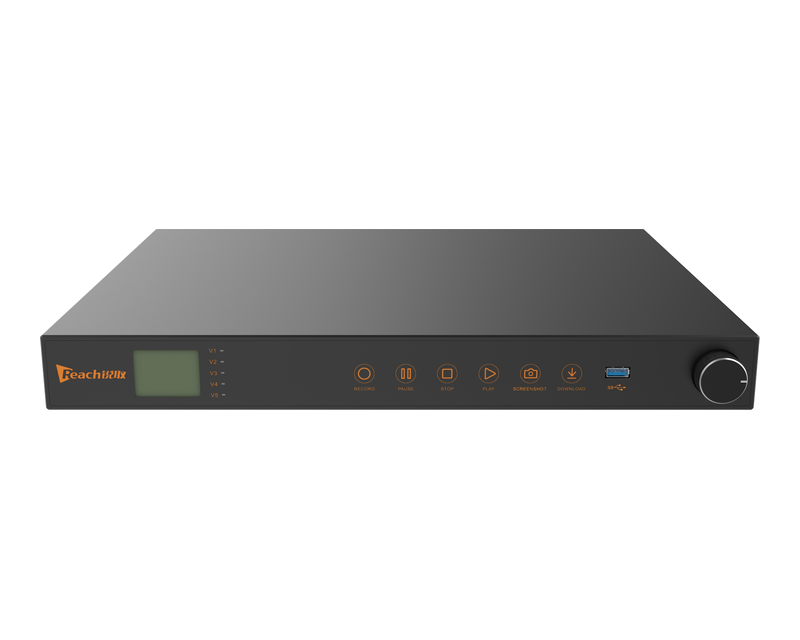

Reach Studio Pro CL560 records four SDI or DVI cameras plus one computer source at once, encoding H.264 MP4 and streaming RTSP or RTMP.
Reach Studio Pro CL560 is a five-channel recorder built for small and medium meeting rooms, training rooms and mobile lecture capture. It is a single 1U appliance: video, audio and computer pictures go in, and a standard MP4 file comes out — the recording runs on the appliance itself, with no capture card and no separate audio interface in the room.
Four HD cameras connect to the SDI or DVI-I inputs — each of the four camera channels accepts either connector — and a laptop or room PC connects to the fifth input, which takes HDMI, DVI or VGA up to 1920 × 1200. The CL560 captures, encodes and records all five pictures plus one audio track at the same time, and the PC director platform composes them into a 2- to 5-picture layout and switches between them while recording continues.
Recordings are written as H.264 / AAC MP4 files to the 2 TB internal disk (expandable to 8 TB), uploaded automatically to an FTP server or the Reach Flow Campus-Media center Pro, and copied to a USB stick or USB hard disk over USB 3.0 — including recording straight to USB. Live pictures go out as standard RTSP or RTMP streams, while HDMI OUT 2 feeds the room display with the live composite and HDMI OUT 1 feeds playback.
On the front: a 2-inch status display, five input indicators and the record, pause, stop, play, screenshot and download keys with a rotary knob. On the rear: audio and camera-control terminals, four SDI and five DVI-I inputs, two HDMI outputs, USB, network, reset and the DC 12 V input.
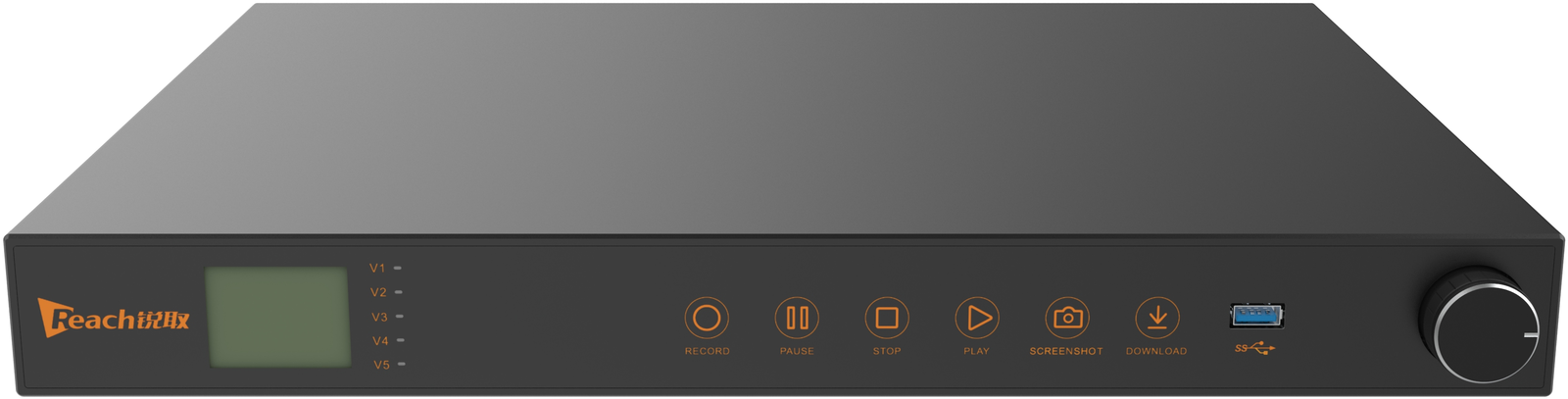
Front panel — 2-inch status display, V1–V5 input indicators, recording keys, USB 3.0 and rotary knob.
Rear panel — LINE IN / MIC IN / LINE OUT, RS-232 camera control, 4 × 3G-SDI IN, 5 × DVI-I IN, HDMI OUT 2 / 1, USB, LAN, reset and DC 12 V.
In a typical room four pan-tilt cameras feed camera channels 1–4 — over SDI or DVI-I, whichever the camera provides — and the room PC or laptop feeds channel 5. Camera movement is controlled from the CL560 over the RS-232 terminal blocks, the room audio comes in on the audio terminals, and the two HDMI outputs drive the live composite on the room display and playback on the review monitor.
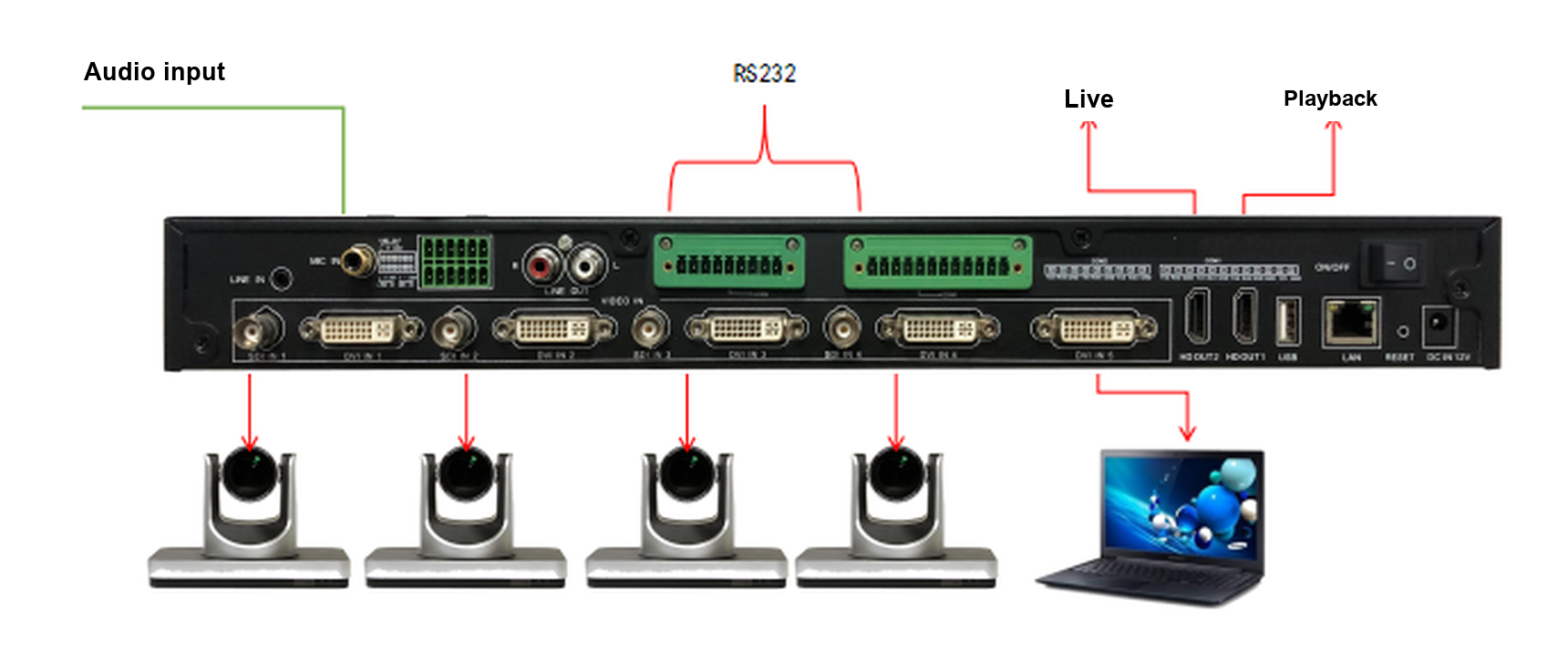
System connection — four cameras and one computer in, RS-232 camera control, audio in, live and playback pictures out.
The front panel is numbered 1–8 and the rear panel 1–22 — the numbering restarts on each panel. The numbers match the labels printed on the unit.
Front panel

Front panel — 1 record, 2 pause, 3 stop, 4 play, 5 screenshot, 6 download, 7 USB 3.0, 8 rotary knob.
| Front panel | Function |
|---|---|
| 1 · Record | Starts recording when the unit is stopped or paused. While recording, the LCD shows a rolling status message. |
| 2 · Pause | Pauses the recording — touch Record again to resume. During playback it pauses the file being played. |
| 3 · Stop | Stops the recording (press twice) and returns the LCD to its default rolling message. During playback it stops the file and returns to the file list. |
| 4 · Play | Opens the playback (VOD) file list; when playback is paused, it resumes the file. |
| 5 · Screenshot | Reserved. |
| 6 · Download | Opens the download list. With a USB device connected, recordings are copied to it. |
| 7 · USB 3.0 | Exports recordings to a USB flash drive or USB hard disk (NTFS or FAT32). Direct recording to the USB device is also supported. |
| 8 · Rotary knob | In playback mode, selects a file and fast-forwards / rewinds it. In download mode, selects a file; press the knob to confirm the download. |
Rear panel

Rear panel — 1–4 audio in / out, 5–6 RS-232 camera control, 7 power switch, 8–15 SDI and DVI-I inputs 1–4, 16 DVI-I IN 5, 17–18 HDMI outputs, 19 USB, 20 LAN, 21 reset, 22 DC 12 V.
| Rear panel | Function |
|---|---|
| 1 · LINE IN | Line-level audio input (local audio). |
| 2 · MIC IN | Microphone audio input. |
| 3 · Audio terminal | Terminal block carrying one LINE IN and one MIC IN input on its lower part and one LINE OUT output on its upper part. Inputs are enabled in the web interface. |
| 4 · LINE OUT | Line-level audio output, RCA left / right. |
| 5 · RS-232 terminal | Camera-control terminal block. Groups 3 and 4 drive pan-tilt cameras 3 and 4; COM5 is reserved. |
| 6 · RS-232 terminal | Camera-control terminal block. Group 0 serves the serial control panel; groups 1 and 2 drive pan-tilt cameras 1 and 2. |
| 7 · Power switch | Switches the unit on and off. |
| 8 · 3G-SDI IN 1 | SDI video input for camera channel 1. |
| 9 · DVI-I IN 1 | DVI-I video input for camera channel 1 (alternative to SDI IN 1). |
| 10 · 3G-SDI IN 2 | SDI video input for camera channel 2. |
| 11 · DVI-I IN 2 | DVI-I video input for camera channel 2 (alternative to SDI IN 2). |
| 12 · 3G-SDI IN 3 | SDI video input for camera channel 3. |
| 13 · DVI-I IN 3 | DVI-I video input for camera channel 3 (alternative to SDI IN 3). |
| 14 · 3G-SDI IN 4 | SDI video input for camera channel 4. |
| 15 · DVI-I IN 4 | DVI-I video input for camera channel 4 (alternative to SDI IN 4). |
| 16 · DVI-I IN 5 | Computer input — accepts HDMI, DVI or VGA signals from a local PC or laptop. |
| 17 · HDMI OUT 2 | HDMI output for the live (composed) picture. |
| 18 · HDMI OUT 1 | HDMI output for the playback picture. |
| 19 · USB | USB port. |
| 20 · LAN | Network port — connects the recorder to the local area network. |
| 21 · Reset | Reset button. |
| 22 · DC 12 V | DC 12 V power input. |
Specifications of the Reach Studio Pro CL560 five-channel recorder.
| Category | Parameter | Specification |
|---|---|---|
| System | Operating system | Embedded Linux |
| Video encoding | H.264 High Profile | |
| Audio encoding | AAC | |
| Recording file format | MP4 | |
| Video inputs | Camera channels 1–4 | 1 × 3G-SDI or 1 × DVI-I per channel — the two connectors on a channel are alternatives |
| Computer channel 5 | 1 × DVI-I IN 5 — accepts HDMI, DVI or VGA | |
| SDI / DVI input resolution | 720p @ 50 / 60, 1080i @ 50 / 60, 1080p @ 25 / 30 / 50 / 60 | |
| HDMI / DVI computer input | 800 × 600 @ 60 Hz to 1920 × 1200 @ 60 Hz | |
| VGA computer input | 800 × 600 @ 60 Hz to 1600 × 1200 @ 60 Hz | |
| Video output | HDMI OUT 2 — live picture | 1280 × 720 @ 60, 1920 × 1080 @ 50 / 60 |
| HDMI OUT 1 — playback | 1920 × 1080 @ 50 / 60 | |
| Encoding | Frame rate | 1–60 fps (maximum 30 fps at 1080p and above) |
| Bit rate | 2 / 4 / 8 Mbps, selectable | |
| Picture composition | 2- to 5-picture composite | |
| Audio | Audio inputs | Microphone: terminal block or RCA; stereo line: terminal block or 3.5 mm |
| Sampling rate | 44.1 kHz | |
| Audio bit rate | 96 kbps | |
| Storage & files | Internal storage | 2 TB standard, expandable to 8 TB |
| Archive | Standard MP4 files on the internal disk, a USB device, an FTP server or the Reach Flow Campus-Media center Pro | |
| File download | USB port, FTP client, web page | |
| Automatic upload | FTP auto-upload to a third-party FTP server or a Reach server | |
| Live & on demand | Streaming protocols | RTSP (TCP / UDP), RTMP (TCP) |
| Live viewing | RTSP / RTMP streams, web-page live preview, live streaming on the Reach Flow Campus-Media center Pro | |
| Playback | HDMI local decoding and playback, web page, VOD on the Reach Flow Campus-Media center Pro | |
| Management | Interfaces | Web page, front-panel keys, PC director platform, serial port and third-party control panel |
| Remote control | Telnet over the network, RS-232 over the serial port | |
| Interface language | Chinese, English | |
| General | Front display | 2-inch LCD |
| Dimensions | 430 × 335 × 44.5 mm (1U) | |
| Weight | 10.0 kg | |
| Power supply | DC 12 V, 2 A | |
| Power consumption | 60 W | |
| Operating temperature | −20 °C to +60 °C | |
| Storage / transport temperature | −40 °C to +80 °C | |
| Relative humidity | 5 % – 95 % |
Four cameras, one computer, one file
Tell us the room layout, how many cameras you need to record and whether the recording is for archive, streaming or both — we will confirm the CL560 configuration, the storage size and the Reach Flow Campus-Media center Pro or FTP workflow that fits your site.
Sales: richard@szreach.com | WhatsApp / WeChat available on request
 Tel:+86 13265602904