

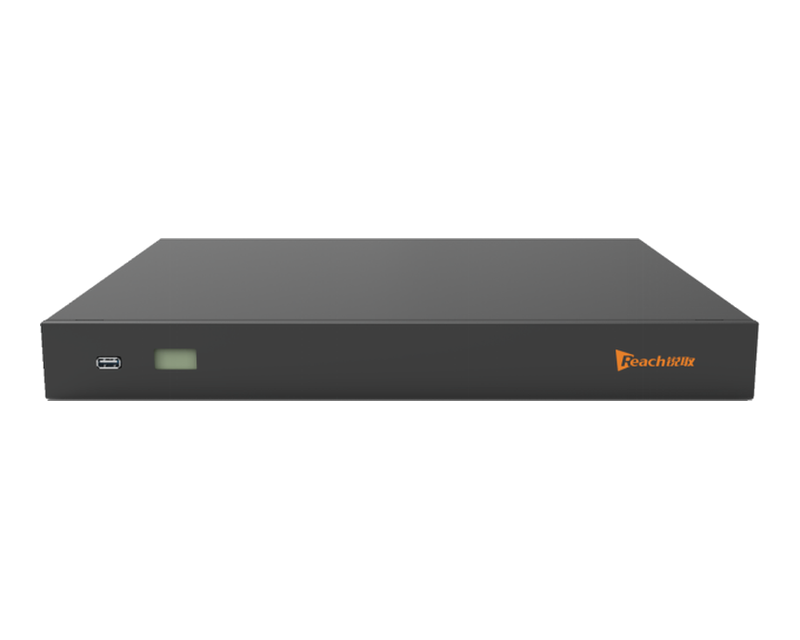

Reach Studio Pro 4K CL580 is an 8-channel 4K recorder: eight HDMI inputs, H.265 / H.264 encoding, five-picture composition and RTSP streaming.
Reach Studio Pro 4K CL580 is an eight-channel 4K recorder for conference rooms, lecture halls, training centres and event spaces. It is a single 1U appliance that takes eight 4K HDMI sources, encodes them, records them and publishes them — the recording runs on the appliance itself, with no capture card and no PC in the room.
All eight inputs accept 3840 × 2160 @ 30 and also 1080p @ 60 / 50 / 30 / 25, so 4K cameras and existing HD laptops can share the same recorder. Encoding is H.265 or H.264, audio is AAC, and every session is written as a standard MP4 file — one file per input in cinema mode, or one composed file when the layout is built live.
Layouts are composed from the PC director platform: up to five pictures on screen, switched while the recording keeps running. The live picture leaves on two HDMI outputs — HDMI OUT 1 at 3840 × 2160 @ 30 or 1920 × 1080 @ 60, HDMI OUT 2 at 1920 × 1080 @ 60 — for the room display and a confidence monitor.
Recordings land on 2 TB of internal storage and can be uploaded automatically to a third-party FTP server or to the Reach Flow Campus-Media center Pro, copied to a USB device, or downloaded from the web interface. Live sessions go out as standard RTSP or RTMP streams at 4K or 1080p, and the same web interface serves the live preview and the on-demand playback.
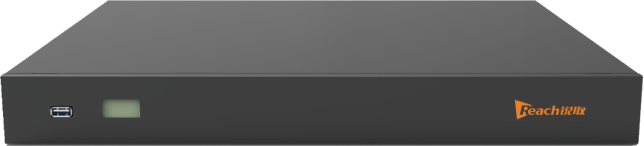
On the front: a status display and a USB port for quick export. On the rear: audio inputs and outputs, the RS-232 camera-control terminal, eight HDMI inputs, two HDMI outputs, four USB ports, the network port, reset, the DC 12 V input and the power switch.
Front panel — status display and USB port.
Rear panel — audio terminals, RS-232 camera control, 8 × HDMI IN, 2 × HDMI OUT, 4 × USB, LAN, reset, DC 12 V and power switch.
A CL580 sits between the sources in the room and the places the session has to reach. The three steps below are the whole signal path.
Up to eight 4K sources
Pan-tilt cameras, a room PC, a document camera and a video-conferencing codec all connect to the eight HDMI inputs — 4K @ 30 or 1080p @ 60. Cameras are moved from the CL580 over RS-232, and room sound enters on the line and microphone inputs.
One appliance, one file set
The CL580 encodes every input with H.265 or H.264 and writes MP4 files to its 2 TB disk — each input separately in cinema mode, or the composed layout in composite mode. A file note and a one-click repair keep the archive readable.
Room display, stream, platform
HDMI OUT 1 and OUT 2 feed the room display and a confidence monitor; RTSP and RTMP streams carry the session to the campus site and remote viewers; FTP upload or the Reach Flow Campus-Media center Pro takes the file off the appliance for long-term storage.
The front panel carries a status display and one USB port. The rear panel is numbered 1–22 from left to right; the numbers match the list below.
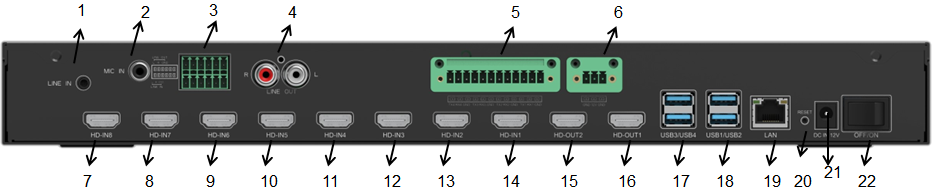
Rear panel — 1 LINE IN, 2 MIC IN, 3 audio terminal, 4 LINE OUT, 5 RS-232 camera control, 6 12 V out, 7–14 HDMI IN 8–1, 15 HDMI OUT 2, 16 HDMI OUT 1, 17–18 USB, 19 LAN, 20 reset, 21 DC 12 V, 22 power switch.
| Rear panel | Function |
|---|---|
| 1 · LINE IN | Local line-level audio input on a 3.5 mm jack. |
| 2 · MIC IN | Microphone audio input on an RCA jack. |
| 3 · Audio terminal block | Lower half: one LINE IN input. Upper half: one LINE OUT output. |
| 4 · LINE OUT | Line-level audio output, RCA left / right. Carries the live sound of the LINE IN source only. |
| 5 · RS-232 terminal block | Camera-control and control-panel terminal. Groups 1–3 drive pan-tilt cameras 1–3; group 4 connects a third-party serial control panel or a CS100 control panel. |
| 6 · 12 V output | 12 V supply output for a CS100 control panel. |
| 7 · HDMI IN 8 | 4K HDMI input 8. |
| 8 · HDMI IN 7 | 4K HDMI input 7. |
| 9 · HDMI IN 6 | 4K HDMI input 6. |
| 10 · HDMI IN 5 | 4K HDMI input 5. |
| 11 · HDMI IN 4 | 4K HDMI input 4. |
| 12 · HDMI IN 3 | 4K HDMI input 3. |
| 13 · HDMI IN 2 | 4K HDMI input 2. |
| 14 · HDMI IN 1 | 4K HDMI input 1. |
| 15 · HDMI OUT 2 | HDMI output 2 — live picture at 1920 × 1080 @ 60. |
| 16 · HDMI OUT 1 | HDMI output 1 — live picture at 3840 × 2160 @ 30 or 1920 × 1080 @ 60. |
| 17 · USB 3 / USB 4 | Two USB 3.0 ports for storage devices and file export. |
| 18 · USB 1 / USB 2 | Two USB 2.0 ports for storage devices and file export. |
| 19 · LAN | RJ45 network port — web interface, RTSP / RTMP streaming, FTP upload, IPv4 and IPv6. |
| 20 · Reset | Reset button. |
| 21 · DC 12 V | DC 12 V power input. |
| 22 · Power switch | Switches the unit on and off. |
Specifications of the Reach Studio Pro 4K CL580 eight-channel 4K recorder.
| Category | Parameter | Specification |
|---|---|---|
| System | Operating system | Embedded Linux |
| Video encoding | H.265 and H.264 | |
| Audio encoding | AAC | |
| Recording file format | MP4 | |
| Video inputs | HDMI IN 1–8 | 8 × HDMI, 3840 × 2160 @ 30, 1920 × 1080 @ 60 / 50 / 30 / 25 |
| Recording resolution | 3840 × 2160 @ 30, 3840 × 2160 @ 25, 1920 × 1080 @ 30, 1920 × 1080 @ 25 | |
| Recording mode | Cinema (each input recorded separately) or composite | |
| Picture composition | Up to five pictures, laid out and switched from the director platform | |
| Video output | HDMI OUT 1 | Live picture at 3840 × 2160 @ 30 or 1920 × 1080 @ 60 |
| HDMI OUT 2 | Live picture at 1920 × 1080 @ 60 | |
| Audio | Audio inputs | 2 × LINE IN (terminal block, 3.5 mm), 1 × MIC IN (RCA) |
| Audio outputs | 2 × LINE OUT (RCA); HDMI audio on the HDMI inputs and outputs | |
| Source selection | One input selected in the web interface; HDMI audio switched on in the web interface | |
| Streaming | Protocols | RTSP (TCP / UDP), RTMP (TCP), HTTP |
| Stream resolution | 4K or 1080p; RTMP pushes HD and SD streams simultaneously | |
| On demand | Web live preview and playback of recorded files | |
| Storage & files | Internal storage | 2 TB standard |
| Archive | Internal disk, USB device, the Reach Flow Campus-Media center Pro or a third-party FTP server | |
| Automatic upload | FTP auto-upload — a third-party FTP server and the Reach Flow Campus-Media center Pro connection are mutually exclusive | |
| File download | USB device, FTP download tool, web interface | |
| File tools | File notes, one-click repair of interrupted recordings | |
| Interfaces | Video | 8 × HDMI IN, 2 × HDMI OUT |
| Audio | LINE IN ×2, MIC IN ×1, LINE OUT ×2, audio terminal block | |
| USB | 2 × USB 3.0, 2 × USB 2.0 (rear), 1 × USB (front) | |
| Network | 1 × RJ45, IPv4 / IPv6 | |
| Serial control | RS-232 terminal block — 3 camera groups plus 1 control-panel group; 12 V output for a CS100 panel | |
| Controls | Web interface, PC director platform, serial and third-party control panel | |
| General | Front panel | Status display and one USB port |
| Dimensions | 430 × 338 × 47.5 mm (1U) | |
| Weight | 5.01 kg | |
| Power supply | DC 12 V, 5 A | |
| Power consumption | 60 W | |
| Operating temperature | −20 °C to +60 °C | |
| Storage / transport temperature | −40 °C to +80 °C | |
| Relative humidity | 5 % – 95 % |
Eight 4K sources, one appliance
Tell us how many cameras and computers the room has, whether the recording is for archive, streaming or both, and how long the sessions run — we will confirm the CL580 configuration, the storage size and the FTP or platform workflow that fits your site.
Sales: richard@szreach.com | WhatsApp / WeChat available on request
 Tel:+86 18589023158