


Camera-mount wireless image transmission box: 1 HDMI and 1 SDI input, HDMI loop-through, 1080p H.264 encoding and a 300 m wireless link.

Reach Go Link HDMI-YC100EX is a compact wireless image transmission box that turns a camera into a wireless source for the Reach Go live production and recording workflow. Mounted on the camera hot shoe, it accepts one HDMI or one SDI input, passes the picture through to the on-camera monitor over HDMI loop-through and transmits an encoded stream over a 5 GHz wireless link to a Reach Go Director-YC300 series host.
Camera work in a classroom, a training room or an event hall usually means long cable runs back to the recording host. Cables are pulled, become a trip hazard and fail in the middle of a session, and a wired camera cannot move with the action. The YC100EX replaces that cable with a wireless link of up to 300 m in the open, 150 m indoors, and keeps running on its own battery for more than six hours, so one operator can set up, film and stream without laying any cable.
Source and picture parameters are set in seconds. A three-position DIP switch selects the HDMI or SDI video input and the HDMI or AUX audio input, including interlaced (I) and progressive (P) formats, while the built-in web interface handles encoding resolution, frame rate, rate control, bit rate and I-frame interval. The 2-inch front display rotates the device IP address, battery level, version information and the active audio and video input types, so the unit can be checked without a phone or a laptop.
The unit is a small, solid camera-top box with two 5 GHz antennas, a 2-inch status display, a power button, a reset button and the complete connector set on one panel. A standard 1/4-inch screw and an external hot-shoe base mount it directly on top of a broadcast camera or on a tripod.
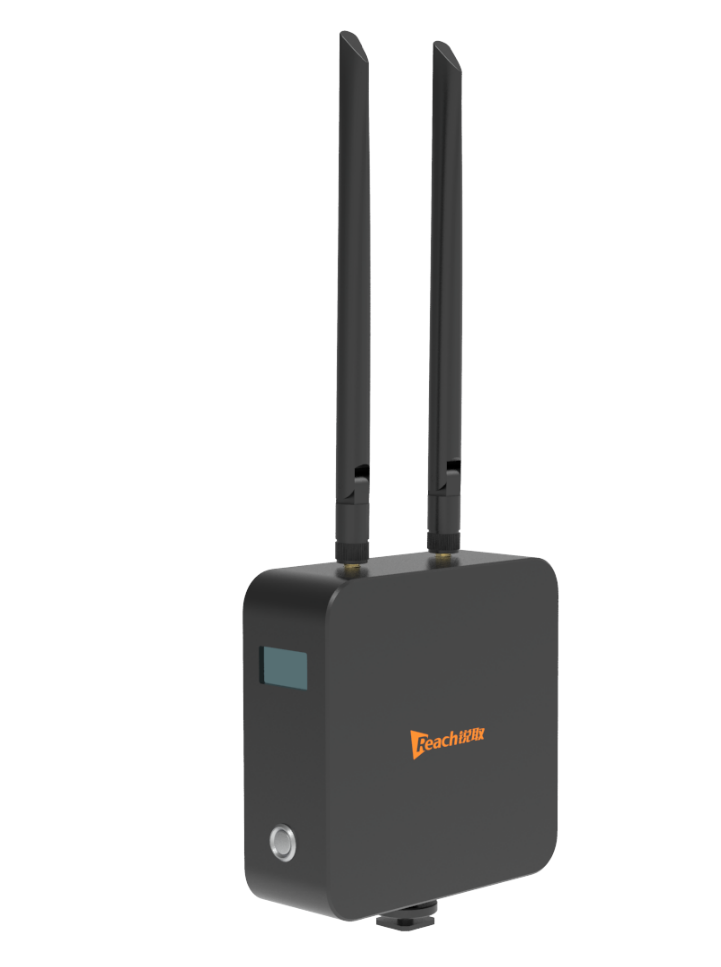
Camera-mount wireless transmission box: two 5 GHz antennas, 2-inch display and power button.
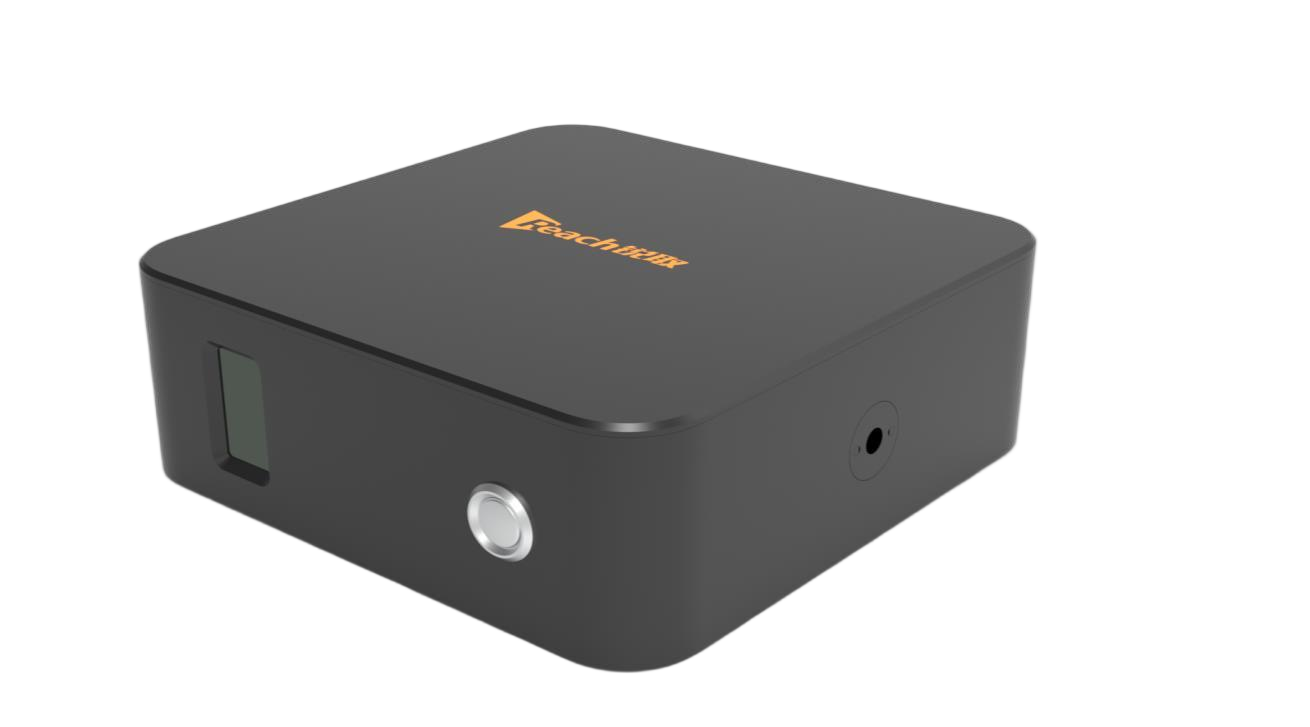
Compact housing with the Reach logo on the top panel and the 2-inch display on the front face.
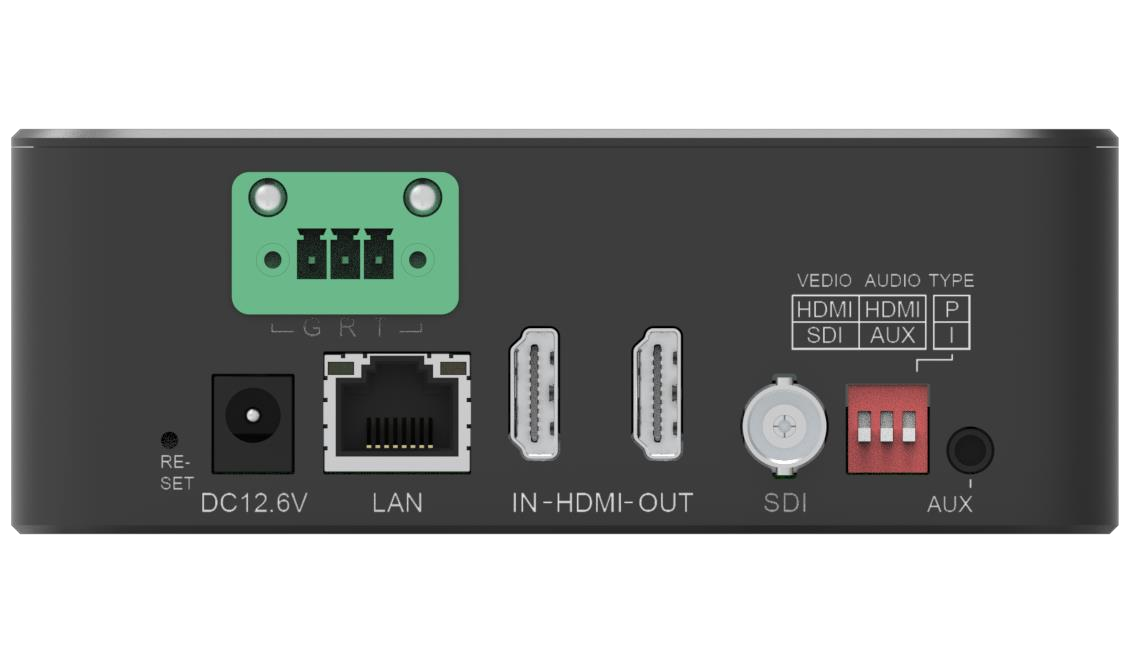
Rear panel: RESET, DC 12.6 V, LAN, HDMI IN and HDMI OUT loop-through, SDI IN, AUX audio, and the VIDEO / AUDIO type DIP switch.
In a typical wireless production a shoulder camera or a live production console feeds the Reach Go Link HDMI-YC100EX over HDMI or SDI. The box transmits the encoded stream wirelessly to the Reach Go Director-YC300 V4 — up to 300 m with a clear outdoor line of sight or up to 150 m indoors. The YC300 mixes the wireless source with its other camera, computer and audio inputs, outputs the programme over HDMI for mixed video out and recording with the visual director interface, and streams it over the network as an RTMP / HTTP stream to live platforms such as YouTube and Facebook. Wireless cameras and wireless handheld microphones join the same system.
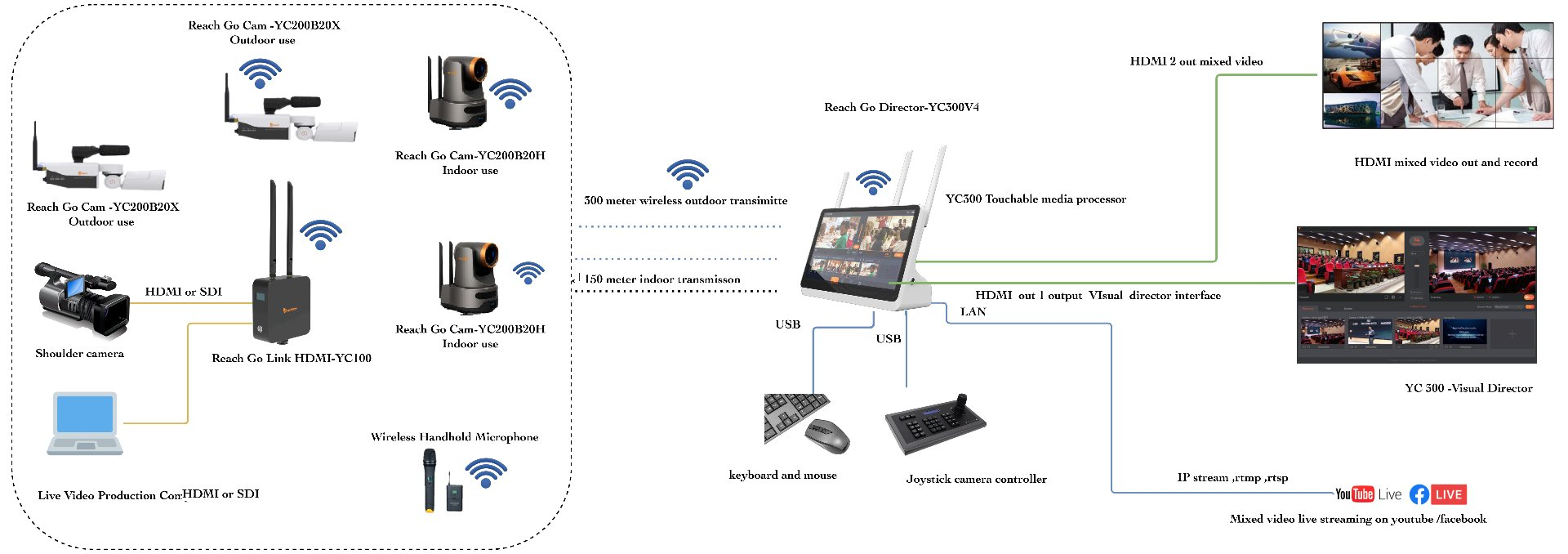
Wireless production topology: cameras and console → Reach Go Link HDMI-YC100EX → wireless link → Reach Go Director-YC300 V4 → HDMI mixed video out and record, plus live streaming over RTMP / HTTP.
The video, audio, network and power connectors sit on a single panel, with the display and power button on the front face and the antenna mounts and camera base on the top and bottom. The numbered callouts below correspond to the interface table.
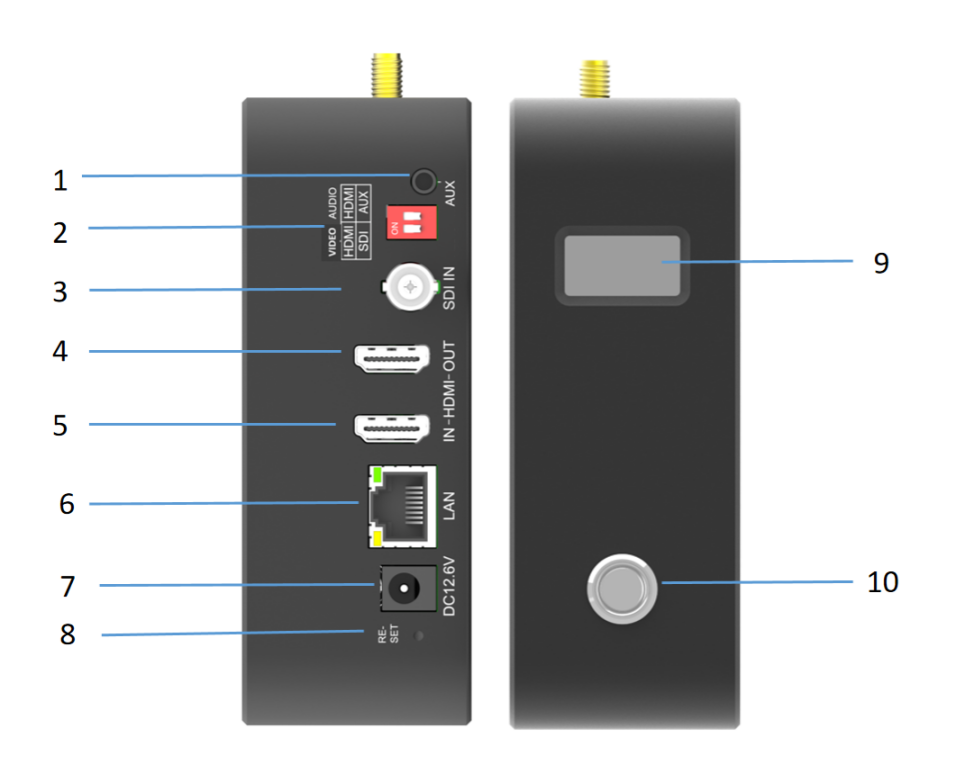
Rear and side panel — 1 AUX audio, 2 DIP switch, 3 SDI IN, 4 HDMI OUT loop-through, 5 HDMI IN, 6 LAN, 7 DC 12.6 V, 8 reset, 9 display, 10 power switch.
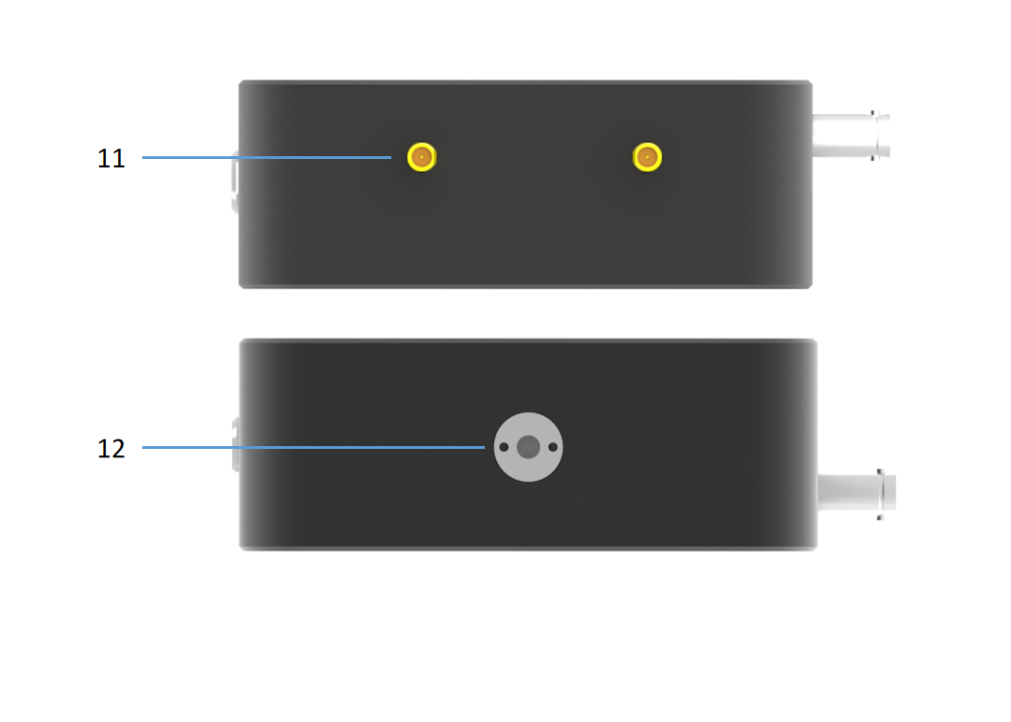
Top and bottom — 11 wireless signal antennas, 12 1/4-inch hot-shoe base.
| No. / Part | Description |
|---|---|
| 1. AUX audio | 3.5 mm audio input |
| 2. DIP switch | Switches the video input (HDMI / SDI) and the audio input (HDMI / AUX) |
| 3. SDI IN | SDI signal input connector; connect an SDI source |
| 4. HDMI OUT | HDMI loop-through picture output |
| 5. HDMI IN | HDMI signal input connector; connect an HDMI source |
| 6. LAN | RJ45 network port |
| 7. DC power | Input for the 12.6 V power adapter |
| 8. Reset | Reset button; resets the wired IP address |
| 9. Display | 2-inch display |
| 10. Power switch | Turns the unit on and off |
| 11. Wireless antennas | Connect the wireless signal antennas. Note: do not point the antennas towards the HDMI connector side, to avoid affecting wireless signal transmission. |
| 12. 1/4-inch hot-shoe base | For mounting on top of a broadcast camera |
Specifications below are for the Reach Go Link HDMI-YC100EX transmission box. Input resolutions and flow control can be set per source from the web interface.
| Category | Parameter | Specification |
|---|---|---|
| Audio & video input | Video input | 1 × HDMI, 1 × SDI |
| Audio input | 1 × HDMI embedded audio, 1 × AUX audio input | |
| Audio & video output | Video output | 1 × HDMI loop-through |
| Audio output | 1 × HDMI audio loop-through | |
| Video | Encoding | H.264 |
| Frame rate | 30 fps | |
| Bit rate | 512 kbps – 20,480 kbps, adjustable | |
| Video input type | I signal / P signal | |
| HDMI input resolution | 3840 × 2160, 1920 × 1080, 1440 × 900, 1360 × 768, 1280 × 720 | |
| SDI input resolution | 1920 × 1080, 1280 × 720 | |
| Encoding resolution | 1920 × 1080, 1280 × 720, 704 × 576, 352 × 288 | |
| Rate control | CBR / VBR | |
| Streaming protocol | RTSP / Reach private protocol (EncoderManager) | |
| Audio | Encoding | AAC |
| Sampling rate | 48 kHz | |
| Streaming protocol | RTSP / Reach private protocol (EncoderManager) | |
| Wireless | Operating frequency | 5.1–5.9 GHz (selectable) |
| Transmission distance | ≤ 300 m (outdoor, open, no obstruction); ≤ 150 m (indoor, no obstruction) | |
| Bandwidth | Up to 300 Mbps (determined by transmission distance and channel occupancy) | |
| Interference mode | Manual / automatic channel selection | |
| Battery | Working time | ≥ 6 hours |
| Charger | 12.6 V / 2 A, dynamic fast charging supported | |
| General | Model | YC100EX — Reach Go Link HDMI-YC100EX |
| Network port | RJ45 | |
| Operating temperature | −10 °C to +60 °C | |
| Power consumption | 10 W typical (according to wireless power) | |
| Dimensions | 126 × 126 × 46 mm; maximum outline including connectors 156.5 × 135 × 46 mm | |
| Weight | 1070 g |
Camera to console without a cable
Add a wireless HDMI / SDI link to an existing Reach Go recording setup, or ask us for a demo unit, volume pricing and a system review for your classrooms, training rooms and event venues.
Sales: richard@szreach.com | WhatsApp / WeChat available on request
 Tel:+86 13265602904